

Overview
KOMOJU Hosted Fields is a front-end library for securely collecting payment information on your website.
All input fields are rendered in a secure iframe hosted by us to minimize your PCI-DSS burden.
Fields uses modern web features to provide easy-to-use components that work well with frameworks like React, VueJS, or even vanilla HTML.
See also Supported Payment Methods.
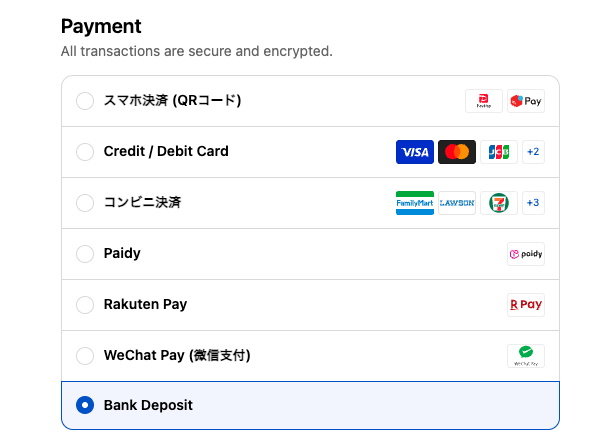
The following image shows an example of a Hosted Fields integration.
Code Example
<script type="module" src="https://multipay.komoju.com/fields.js"></script>

<form>
  <!-- optional payment method picker -->
  <komoju-picker></komoju-picker>

  <komoju-fields
  	session-id={your_session_id}
    publishable-key={your_publishable_key}
  ></komoju-fields>

  <button type="submit">Pay</button>
</form>
Full list of attributes
Here are the attributes accepted by the <komoju-fields> tag:
session-id (required)
This session tells Fields which payment methods to render, and ensures payment amount cannot be changed on the front-end.
<!-- Create a session on your back-end and pass it to komoju-fields. -->
<komoju-fields
  session-id="abc123xyz"
  publishable-key="YOUR_PUBLISHABLE_KEY"
></komoju-fields>
publishable-key (required)
Your publishable key is required in order for Fields to access the KOMOJU API.
Everything KOMOJU Fields does under the hood can be done via our regular JSON API.
<!-- Your publishable key is required in order for Fields to access the KOMOJU API. -->
<komoju-fields
  session-id="{...}"
  publishable-key="pk_live_abc123"
></komoju-fields>
session
Avoid a round-trip by passing the entire KOMOJU Session JSON.
<!-- If you specify session, session-id is no longer requried. -->
<komoju-fields
  session="{...}"
  publishable-key="YOUR_PUBLISHABLE_KEY"
></komoju-fields>
payment-type
This is only useful if you're creating sessions that support multiple payment types. Your options are:
- use
<komoju-picker>, - create a session with only one payment type, or
- use the
payment-typeattribute manually like below.
<!-- Pre-select payment type. -->
<komoju-fields
  payment-type="konbini"
  session-id="SESSION_ID_FROM_KOMOJU_API"
  publishable-key="YOUR_PUBLISHABLE_KEY"
></komoju-fields>

<!-- You can change this payment-type attribute during runtime too. -->
<!-- This can be used to make your own payment method picker. -->
<script>
  const fields = document.querySelector('komoju-fields');
  fields.paymentType = 'credit_card';

  // You can also access the session object to see which payment types are available.
  console.log(fields.session.payment_methods);
</script>
theme
Hosted Fields supports loading custom CSS to better fit the look and feel of your website.
See Hosted Fields | Custom Styling for more detail.
<!-- Set custom CSS -->
<komoju-fields
  session-id="abc123xyz"
  publishable-key="YOUR_PUBLISHABLE_KEY"
  theme="https://example.com/my-fields-theme.css"
></komoju-fields>
token and name
These attributes allow your <komoju-fields> to act like an <input> tag whose value is a Token ID of the user's input.
See Hosted Fields | Tokens Integration for more detail.
<!-- 'token' is a boolean attribute that activates token mode -->
<komoju-fields
  token name="komoju_token"
  session="{...}"
  publishable-key="YOUR_PUBLISHABLE_KEY"
></komoju-fields>

<!-- You can either submit the form normally, or obtain the token via JS: -->
<script>
  (async () => {
    const fields = document.querySelector('komoju-fields');
    const token = await fields.submit();
    console.log(token);
  })()
</script>